What Is a Route Optimizer for Lawn Care?
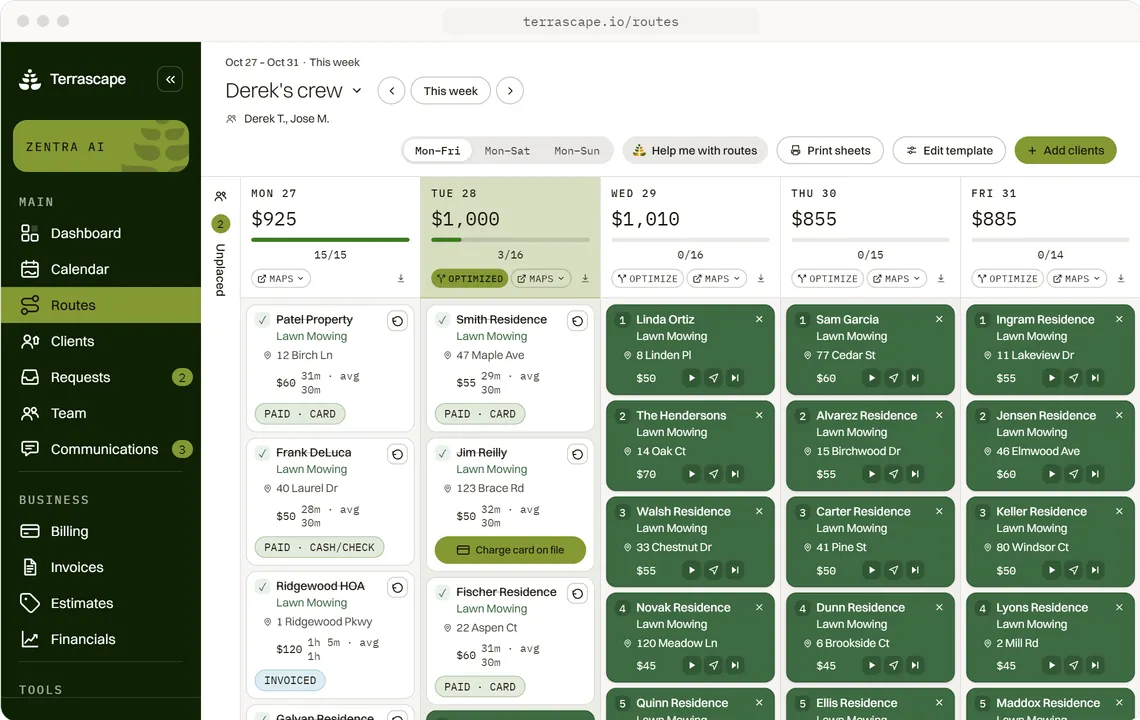
A route optimizer for lawn care is software that takes the day's stops and orders them into the shortest, most sensible drive, instead of the order you happened to write them down. Terrascape does exactly that for landscaping crews: drop the week's properties in once, and it sequences every stop by real Google Maps drive time so crews mow more lawns and burn less of the day between them.
Here is the thing. The hardest part of a route isn't the driving, it's the planning. You're at the kitchen table on a Sunday night with a notebook and a sense of dread, trying to remember which side of town the Tuesday accounts are on. One stop in the wrong order and your crew is crossing the county twice before lunch.
Route planning is one of the quiet line items on a landscaper's week: about 1 to 2 hours every Sunday night, on top of the 15 to 30 hours the business side eats overall. A route optimizer doesn't just save the driving time during the week. It gives you back the planning hours too. That is what Terrascape's operations engine is built to do.
How Does Terrascape's Route Optimizer Work?
Terrascape's route optimizer works in three moves: you drop the stops in, it sequences them by live drive time, and Zentra pushes the finished plan to the right crew before Monday starts. You stay in control the whole way, the route optimizer proposes and you approve.
Here is what that looks like across a normal week:
- Drop the week's stops in once. You set up the properties a crew handles, and Terrascape builds reusable weekly route templates. One click rolls the same week forward instead of rebuilding it from scratch every Sunday.
- Sequenced by real Google Maps drive time. Every stop is ordered by actual road time between properties, not a straight-line guess. The result is a tighter day: fewer crossings, less fuel, more lawns.
- Drag any stop to reschedule. A client calls and needs Thursday instead of Tuesday? Drag the stop on the calendar and the route re-sequences around it. No erasing and rewriting the whole day.
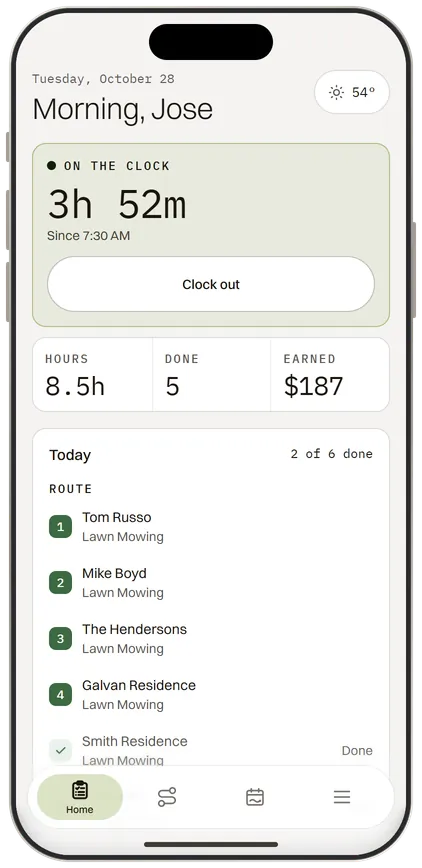
- Pushed to the crew at 6 AM Monday. Zentra sends the plan to the right crew automatically, every Monday. The crew opens their phone to today's stops in order, with the first address, gate code, and dog warning already in view.
This is the difference between a static calendar and a route optimizer. A calendar shows you the jobs. A route optimizer puts them in the order that gets your crew home earlier. Want the full operations picture, scheduling, crew, and client history in one system? See the operations feature page.
What Happens to the Route When It Rains?
When the weather turns, Terrascape's AI co-pilot rebuilds the affected route and drafts a text to every client on it, so a rainy Tuesday doesn't cost you an evening of phone calls. You approve the move, it sends. Rescheduling 8 lawn accounts around a storm is a problem that's unique to this trade, and it's where most route software leaves you on your own.
Rain doesn't cancel a plumbing job. It cancels yours. And the old fix is brutal: you sit there Monday night re-pencilling Tuesday's stops into Friday, then text fourteen people one at a time to tell them.
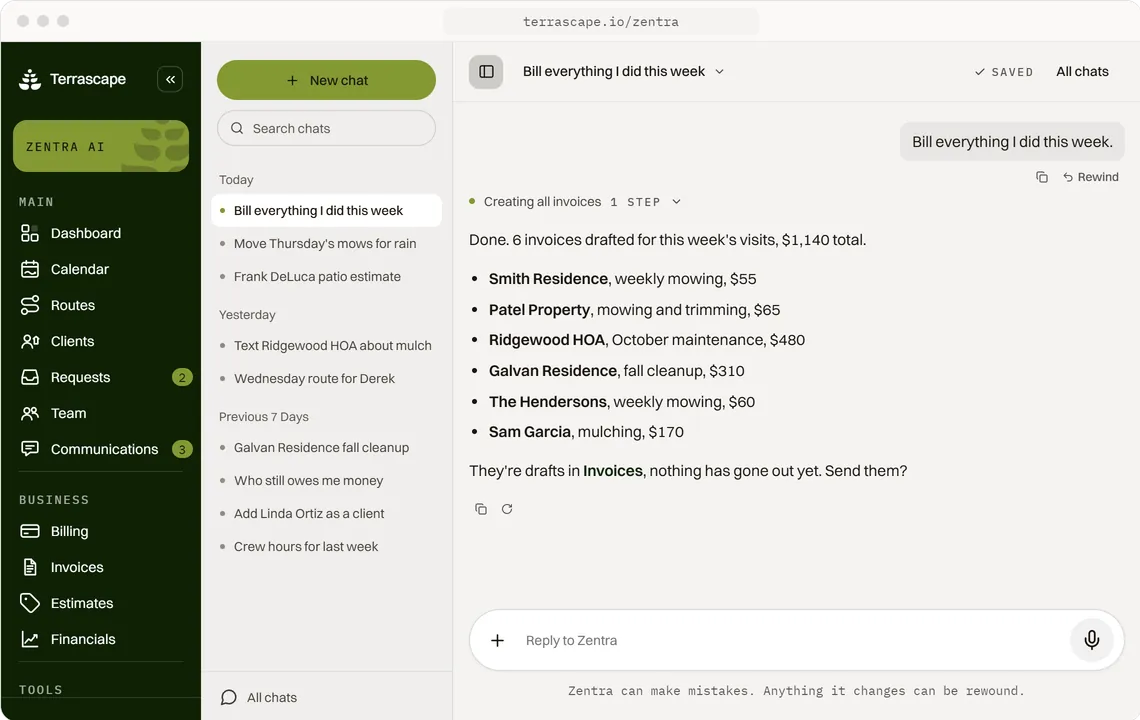
Here's how it goes with Zentra instead. You say "rain all day tomorrow, push the Mercer route to Friday and tell everyone." Zentra moves the stops, re-sequences Friday's drive so the bumped jobs slot in cleanly, and drafts a text to every affected client in your voice. You read it, you tap send. The whole reshuffle is a sentence and a thumb tap.
That is the model for the whole platform, and it matters here most: automation that acts on its own is the scary kind, the reschedule that double-books a crew, the text that goes to a client who already moved. Zentra checks before it acts. The route optimizer proposes the new plan and the client texts. You stay the one who says go.
How Does Terrascape's Routing Compare to Other Tools?
Most field-service tools include route optimization, but they price it per seat or per route and treat landscaping's seasonal, weather-driven rescheduling as an afterthought. Terrascape is one flat $49.99 a month with a 7-day free trial and unlimited employees, and it's the one that has an AI co-pilot rebuild the route and text the clients when the day changes.
A quick honest read of the field, with starting prices verified against each company's published pricing:
- Jobber includes routing and GPS on its Connect plan, $199 a month for 5 users, and each extra user is $29 a month on top as you grow.
- Housecall Pro runs $189 a month (Essentials, 5 users) for the plan most crews need, with per-seat costs above the plan limit.
- ServiceTitan has no public pricing; you request a quote, priced per technician, with dispatch and routing built for 50-plus-truck operations, not a 3-person lawn crew.
- Yardbook has a genuinely free ad-supported tier with basic scheduling, but no AI co-pilot and no automatic weather-driven re-routing.
The pattern across the category: routing is a feature buried in a general-purpose dashboard you operate, and the headline price is for one user. None of them rebuild the route and draft the client texts on a one-line command. That is the line Terrascape is drawn on. For a side-by-side on the platform overall, see Terrascape vs Jobber.
Who Is This Route Optimizer For?
Terrascape's route optimizer is built for lawn care and landscaping crews of 1 to 15 that run recurring weekly and bi-weekly stops, the operator who is the owner, scheduler, and crew lead at once. If you're still building Tuesday's route in a notebook and it's starting to crack, this is built for exactly that moment.
Being straight about the edges matters as much as the pitch:
- The route optimizer is part of Terrascape, the full platform with client records, invoicing, and communication. It is not a standalone driving app you bolt onto other software, and there's no separate free routing tool to download. You run it inside the product.
- It sequences by road drive time, not by truck weight, equipment load, or fuel-stop planning. If you need fleet-grade logistics with vehicle constraints, that is a different category of tool.
- It is not a customer-facing autopilot. Zentra is an owner-facing co-pilot. It proposes the route and the reschedule texts, and you approve before anything moves or sends.
A notebook route works at 10 stops. It starts cracking at 50 and falls apart at 150. There's no shame in starting with a notebook, every operator did. The question is when the Sunday-night planning starts costing you more than the alternative. If you're past that line, you're who this is for.
How Do You Get Started?
Getting started is a 4-step self-serve package you work through on your own, with Zentra walking you through the platform as you go. There's no required demo call to see what it costs, and no multi-week onboarding before you can build a route.
Here's the honest version of the first week:
- Sign up. Start a 7-day free trial, then $49.99 a month, with no contract and no cancellation fee.
- Bring your stops over. Export your client list from whatever you use now and the team at Terrascape handles the import, or you add properties as you go. You never start from a blank map.
- Build the week once. Drop a crew's recurring stops into a route template. Terrascape sequences them by live Google Maps drive time, and the template rolls forward every week.
- Let Zentra run Monday. From the first Monday, the plan lands on the crew's phone at 6 AM, and when the weather turns, Zentra drafts the reschedule and the client texts for your approval.
The route optimizer is one piece of a platform that also drafts your invoices, texts your clients, and hands you a 19-signal Daily Brief every morning. You get your Sunday nights back, and your crew gets a day that actually makes sense. That's the point. Not another dashboard to babysit, an employee who handles the part you never signed up for.